🎖️ Module 13: Securing Your Recruit Badge
Codename: OPERATION FIELD READY
Time: 20 minutes
Scenario: Course Completion and Next Steps
Congratulations! 🎉
You've completed the Agent Academy — Recruit Course and built Bit, your Contoso IT help desk buddy — a production-ready agent built entirely in the new Copilot Studio experience.
This module will:
- Verify you've completed the hands-on labs
- Help you claim your Recruit Badge
- Get you started planning your own first agent
- Point you to what's next
✅ Course Completion Checklist
Module 00 — Course Setup ✅
- [ ] Switched to the new experience ("Try it now")
- [ ] Have the IT Help Desk SharePoint site + Tickets list
- [ ] Prepared the Contoso IT FAQ and Approved Software List
Modules 01–02 — Foundations ✅
- [ ] Understand LLMs, RAG, and the enhanced orchestrator
- [ ] Know the Build-page blocks: Instructions, Knowledge, Skills, Tools, Memory, Connected agents, Model
Modules 03–05 — Before Building Bit ✅
- [ ] (Side-quest) Created a declarative agent for M365 Copilot
- [ ] Created the Contoso Helpdesk Agent solution + set it preferred
- [ ] Explored a template (your quick "first agent")
Module 06 — Build Bit ✅
- [ ] Created Bit from a natural-language description
- [ ] Wrote instructions + guardrails
- [ ] Uploaded the two knowledge documents
- [ ] Turned on Memory
- [ ] Tested in Preview (hours, software, graceful unknown)
Module 07 — Skills & Tools ✅
- [ ] Authored 4 skills (
password-reset,vpn-troubleshooting,smart-triage,software-installation-request) - [ ] Added the Send an email and Create item tools
- [ ] Logged a ticket end-to-end + a PDF report
Module 08 — Adaptive Cards ✅
- [ ] Presented a logged ticket as a rich Adaptive Card
Module 09 — Workflows ✅
- [ ] Built
manager_approval_for_software(get manager → approval → branch, parallel respond) - [ ] Called it from
software-installation-request; tested Visio
Module 10 — Event Triggers ✅
- [ ] Added an autonomous trigger on the Tickets list (High/Critical → escalate)
Module 11 — Evaluate & Ship ✅
- [ ] Ran an evaluation set
- [ ] Published to Teams + M365 Copilot, shared, and viewed Monitor
Module 12 — Licensing ✅
- [ ] Understand trial vs. production licensing and message-based cost
🏗️ What You've Built
Recap of Bit, built entirely in the new experience:
- ✅ Created from Instructions on the Build page, with Settings, a greeting, and suggested prompts
- ✅ Grounded with Knowledge and Memory
- ✅ Four reusable markdown Skills
- ✅ Tools (Outlook Send an email, SharePoint Create item) — logs tickets end-to-end with a PDF report
- ✅ A rich Adaptive Card ticket confirmation
- ✅ A manager-approval Workflow (100-second pattern), called from a skill
- ✅ An autonomous Event Trigger that escalates High/Critical tickets
- ✅ Evaluated, then Published to Teams + M365 Copilot, Shared, and Monitored
No topics. No trigger phrases. All new experience. 🚀
🎖️ Claiming Your Recruit Badge
Step 1: Verify Your Solution
- Go to https://make.powerapps.com → Solutions → Contoso Helpdesk Agent
- Verify it contains:
- Copilot: Bit
- Workflows / Cloud flows:
manager_approval_for_software(and any escalation flow) - Connection references: SharePoint, Office 365 Outlook, Office 365 Users
✅ Checkpoint: Your solution is complete and packaged.
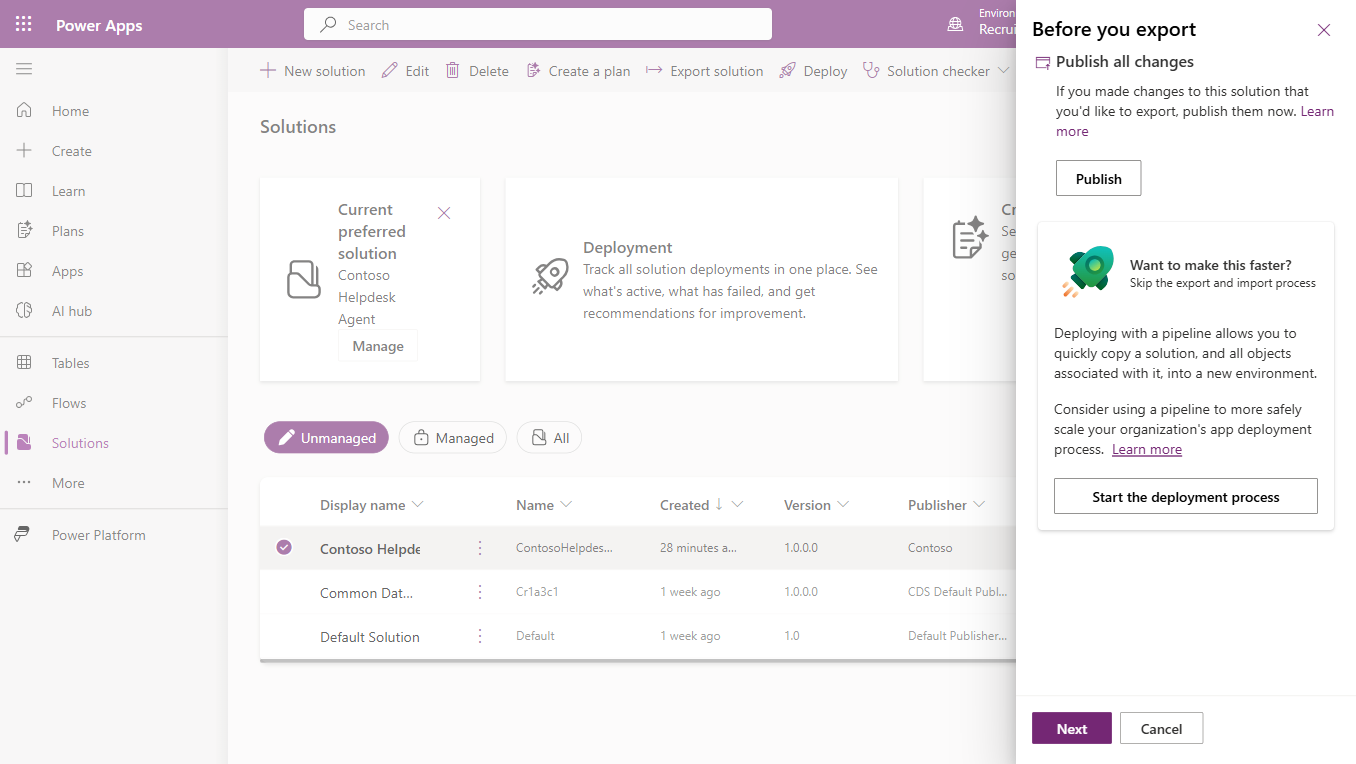
Step 2: Export Your Solution (Proof of Completion)
- In Solutions, select Contoso Helpdesk Agent → Export
- Choose Managed (for deployment) or Unmanaged (for backup) → Export
- The
.zipdownloads — a portable backup of all your work
✅ Checkpoint: You have a portable copy of Bit.
Step 3: Claim the Badge
Badge claiming depends on how this course is delivered. In an instructor-led workshop, follow your facilitator's instructions; self-paced learners can use Microsoft Learn or the community options.
- Instructor-led: notify your facilitator, demo Bit in Teams or the demo website, and receive your completion certificate.
- Microsoft Learn: complete any knowledge checks in the learning path; your badge appears under Profile → Achievements.
- Community: submit proof (a screenshot of Bit in Teams, or your exported
.zip).
📝 Plan Your First Agent
Bit was a guided build. Now sketch an agent for a real problem on your own team:
- Pick a job — what repetitive question or task eats your team's time?
- Name the knowledge — which documents/sites ground it?
- List the skills — 2–4 behaviors (the "playbooks")
- List the actions — what tools/workflows does it need (email, create item, approval)?
- Decide autonomy — is there an event it should react to on its own?
✏️ Jot this down before you leave — the hardest part is starting, and you now know exactly how each piece is built.
🚀 Keep Building
From Recruit to Special Ops
The Special Ops course goes further:
- Multi-agent orchestration (Connected agents at scale)
- MCP integrations and frontier models
- Voice agents and Computer Use
- Custom evaluations and production ALM (CI/CD, environments)
Community & Resources
- What's New in Copilot Studio — monthly releases
- Copilot Studio Community
- Certifications worth pursuing: PL-900, PL-200, PL-400
💭 Final Thoughts
You started with a blank canvas. Now you have Bit — grounded, action-taking, ticket-logging, approval-running, self-escalating — plus the skills to build the next one.
Go build amazing agents. Welcome to the Academy, Recruit. 🎖️ #ColorCloud2026
Course Navigation: ← Module 12 | Course Index | Workshop Agenda