🔁 Module 09: Automate Approvals with Workflows
Codename: OPERATION CHAIN REACTION
Time: 45 minutes
Scenario: Manager Approval for Software
🎯 Learning Objectives
By the end of this module, you will be able to:
- Create a Workflow from the Tools block using the new workflow designer
- Define input parameters and a Respond to the agent action (mind the 100-second limit)
- Build an approval gate: Get manager → Human review (Request for information) → If/else
- Run the human-review step and the "respond to agent" step in parallel
- Call the workflow from the
software-installation-requestskill and test a Visio request
🧭 Overview
Some software on the Contoso list needs manager sign-off. That's a multi-step process — find the manager, request approval, wait, react — and it can take longer than a single chat turn. The new Workflows designer handles it.
You'll build manager_approval_for_software, add it to Bit as a tool, then update the software-installation-request skill (from Module 07) to call it.
🔁 Workflows, Briefly
A Workflow is the new flows format in Copilot Studio, with a revamped visual designer and testing. Attach it to an agent as a tool: the agent calls it, passes inputs, and the workflow can respond back to the agent.
⏱️ The 100-second rule. When an agent calls a workflow, the workflow must respond within ~100 seconds. A human approval takes longer than that — so we start the approval and immediately respond to Bit ("approval started"), running both in parallel.
🧠 Workflows include agentic actions too — call other agents, classify info with AI, use M365 Copilot, and more.
⚠️ Hyphens vs. underscores (again). Your skills use hyphens (
software-installation-request). This workflow is namedmanager_approval_for_softwarewith underscores — workflows follow different naming rules. Both are correct.
🧰 Prerequisites
- Bit with the
software-installation-requestskill from Module 07. - The Office 365 Users connector (to look up the manager) and an Outlook / Office 365 connection (the Human review step sends its request by email).
- A test user whose manager is set in the directory.
🏫 In the facilitated workshop, the connectors and a test user with a manager are pre-provisioned. If you're at the office, ensure your test account has a manager populated in Microsoft Entra ID.
🧪 Lab 9.1: Create the Workflow
Create the workflow from Bit, so it's wired to be agent-callable from the start:
On Bit's Build page, find the Tools block → + Add a tool.
In the dialog, click the + Add button (top-right) → choose Workflow. This opens the new workflow designer.
Name it (click Untitled Workflow, top-left):
textmanager_approval_for_software
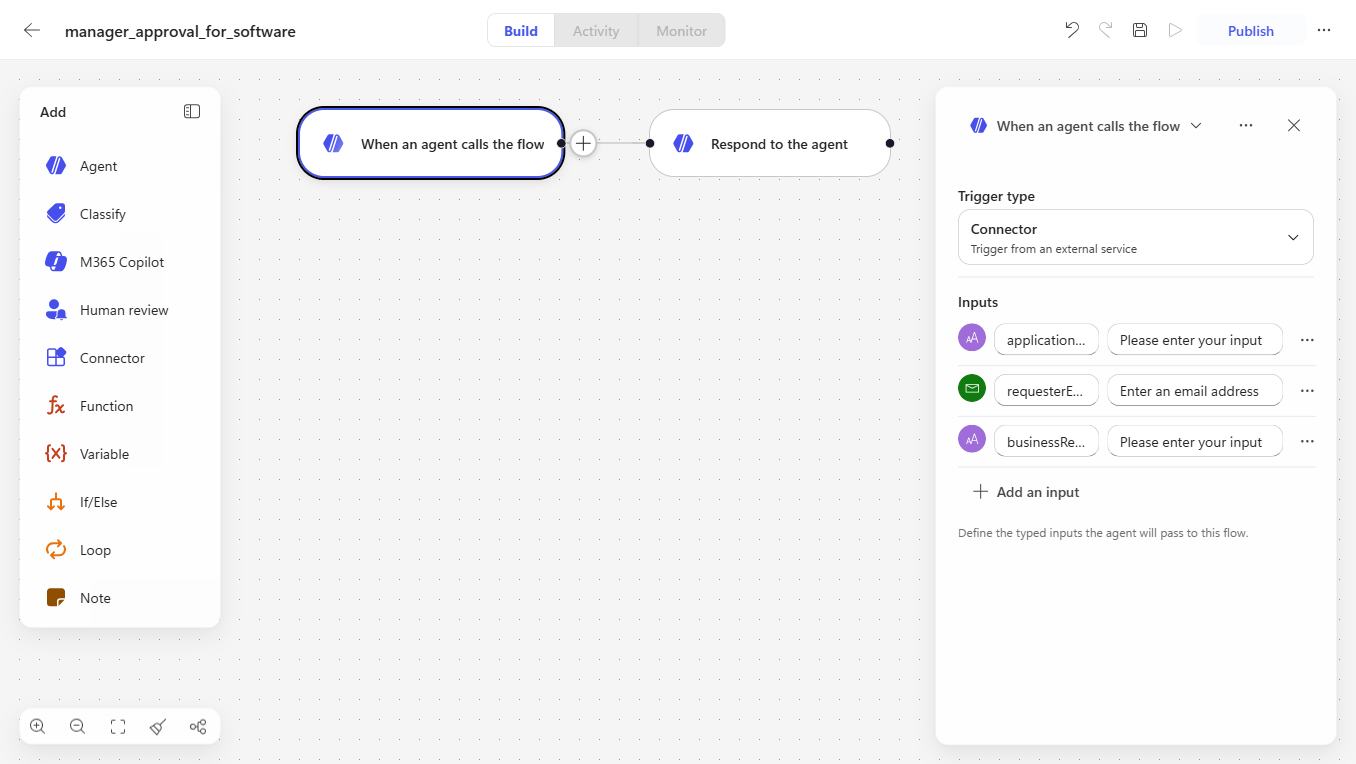
🧷 Why create it from Tools (not the standalone Workflows area)? Starting here gives you a workflow that already has the "When an agent calls the flow" trigger and a "Respond to the agent" action — exactly what an agent-called approval needs. (A workflow created from the left-nav Workflows area starts with a generic Manual trigger instead, which is not what we want.)
🧪 Lab 9.2: Define Inputs (What the Agent Passes In)
On the When an agent calls the flow trigger, use the Inputs panel → + Add an input (pick the type, then name it) for each of these:
| Input | Type |
|---|---|
applicationName | Text |
requesterEmail | |
businessReason | Text |
💡 These are the typed inputs the agent passes to the flow — they show up in the trigger's Inputs panel (see the Lab 9.1 screenshot above). Choosing Email for
requesterEmailvalidates the address Bit hands in.
🧪 Lab 9.3: Get the Manager
- Add a step using the Office 365 Users connector → Get manager (V2).
- For the input (user/UPN), pass
requesterEmail.
🧪 Lab 9.4: Add the Approval Gate (Human Review)
In the new Workflows designer, a human approval is a Human review step — not the classic "Approvals" connector. Add a step → search Human review → choose Request for information. (Workflows prompt you to pick a connection the first time — set one up if asked.)
Configure it:
- Title:
Approval needed for [applicationName] - Message: include
requesterEmail,businessReason, andapplicationNameso the manager has the context to decide. - Assigned to: the manager's Mail from the Get manager step. (First person to respond decides.)
- Add an input → type Yes/No, named
Approved. This captures the manager's decision and comes back as a parameter you'll branch on next.
🧩 Why "Request for information"? The new Workflows designer puts human-in-the-loop steps under Human review. Request for information pauses the workflow, emails the assignee via Outlook, and returns their answer — a Yes/No input turns it into a clean approve/reject gate. (The richer multi-stage approval action is currently agent-flow only — see the fallback at the end if you need it.)
🧪 Lab 9.5: Branch on the Decision
After the Request for information step, add an If/else (Condition) on the Approved value it returned:
- If
Approvedis true → your approved path. For the demo, add a Compose action with the static valueapproved(in production: notify the team / provision the license / write to your system of record). - Else (rejected) → add a Compose with
rejected.
🧪 Lab 9.6: Respond to the Agent — in Parallel
The Request for information step waits for the manager (maybe minutes or hours), but Bit needs an answer within ~100 seconds. So run them side by side:
Create a parallel branch alongside the Human review branch.
In the parallel branch, add Respond to the agent with a message like:
textManager approval process has started. You will be notified once it completes.
So the workflow simultaneously: (a) sends the human-review request and waits for the manager, and (b) tells Bit the process kicked off.
📢 Lab 9.7: Publish the Workflow
Publish the workflow so Bit can call it.
✅ Checkpoint: manager_approval_for_software is published and available to Bit as a tool.
🧪 Lab 9.8: Update the Skill to Call the Workflow
Skills → open
software-installation-request→ edit instructions. Add:markdown# If manager sign-off is needed If the requested app requires manager sign-off (per the Approved Software List), call the manager_approval_for_software workflow, passing the application name, the requester's email, and a short business reason. Then tell the user the approval request has been sent to their manager.Save the skill.
🧪 Lab 9.9: Test the Visio Request
Preview → new chat:
textI need Microsoft Visio installed for a project.Bit uses
software-installation-request, checks the Approved Software List, sees Visio requires manager approval, and callsmanager_approval_for_software. He replies that the approval request was sent.Watch the workflow run: it triggers, gets the manager, and responds back to Bit.
As the manager: open the Request for information email in the manager's mailbox (sent via Outlook), set
Approvedto Yes or No, and submit. The workflow then continues into your If/else branch.
In production the approved branch would notify the team to provision the license; here the Compose values prove the branch logic works.
✅ Checkpoint: Bit starts a real, long-running approval and reports status back to the user.
🪂 Fallback: Prefer a Classic Agent Flow?
⚠️ Facilitator note. This lab uses the new Workflows designer with a Human review → Request for information gate. If your tenant doesn't have it (or you want the GA path), build the same logic as a classic agent flow instead: Get manager → Approvals: Start and wait for an approval → If/else on the approval Response, with Respond to the agent in a parallel branch. The 100-second constraint applies either way. Confirm which is available before the workshop.
🧠 Key Takeaways
- Workflows are the new flows format — attach them to Bit as tools
- The 100-second rule — respond to the agent fast; run long work (approvals) in parallel
- Get manager → human review → if/else — a real, multi-step business process
- Skills call workflows —
software-installation-requesttriggers the approval; you describe intent, the orchestrator passes the inputs - Workflows use underscores; skills use hyphens — different naming rules
🏗️ What You've Built
Bit can now run a manager-approval process for software that needs sign-off:
- ✅ A
manager_approval_for_softwareworkflow (get manager → human review → branch, with a parallel respond) - ✅ The
software-installation-requestskill calls it - ✅ Self-service apps install immediately; manager-sign-off apps route to the manager
⏭️ Next Steps
In Module 10: Autonomous Event Triggers, you'll make Bit proactive — automatically escalating a high-priority ticket the moment one is created in the Tickets list, with no one having to ask.
Course Navigation: ← Module 08 | Course Index | Next: Module 10 →